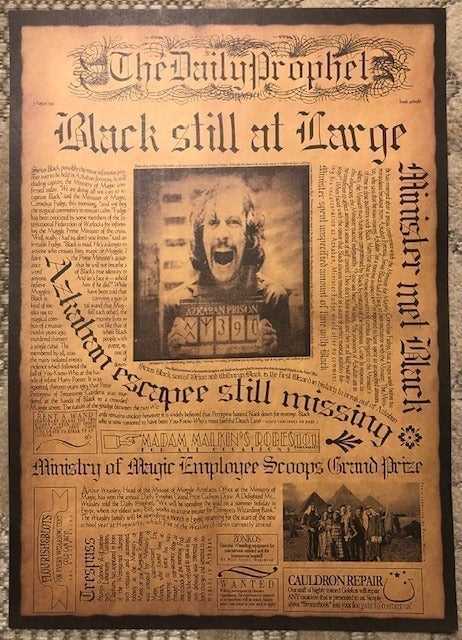
Steps for Crafting Your Custom Wizarding News
Begin by choosing the format for your project. Use programs like Microsoft Word, Google Docs, or graphic design tools such as Canva or Adobe Spark. They offer templates that can be easily customized. Once you have selected your platform, focus on the layout:
- Title: Choose a magical headline that fits the theme–consider names like “The Daily Prophet” or “The Quibbler.”
- Columns: Organize the text into several columns. Use classic newspaper-style formatting to make your design feel authentic.
- Images: Find royalty-free images or illustrations that match your theme. Vintage black-and-white photos work well to capture the classic wizarding look.
- Text Style: Use serif fonts for the body text and something decorative for the titles, similar to old-fashioned printings.
Where to Find Design Resources for Your Wizarding Paper
Several online platforms offer pre-designed templates that fit perfectly for creating a magical-themed article or newspaper. You can start by searching these options:
- Canva: It offers a variety of free templates, including vintage designs that mimic old newspaper articles. Simply search for “vintage news” or “medieval style” templates.
- Creative Market: Look for “fantasy” or “vintage newspaper” templates, where you can buy high-quality designs, often crafted by professionals.
- Design Bundles: Provides affordable bundles of themed fonts, graphics, and layouts that can make your project stand out.
- Freepik: Search for editorial-style illustrations and images. You can easily customize them for a magical newspaper experience.
Incorporating these elements will ensure your project is not only visually striking but also deeply connected to the world you’re recreating. Tailor each aspect of the design to fit the magical theme you’re aiming for, whether it’s a daily journal from the wizarding world or a quirky magazine showcasing unique magical events. The possibilities are endless, so let your creativity guide you!
Designing a Magical Wizarding World Journal
To create an authentic wizarding journal, start by selecting a classic layout. Use columns to mimic the look of old publications. Keep your font choices simple–serif fonts work well for the main text, while decorative fonts should be used for the headlines and subheadings. A headline like “Breaking News from the Ministry” will instantly evoke the atmosphere of magical publications.
For a truly magical effect, include a border or borderless design. Adding subtle textures, such as parchment or scroll-like backgrounds, will provide a more historical feel. Pay attention to spacing between columns, ensuring the text is readable and neatly aligned. A cluttered design can make your piece feel less authentic.
Images are an integral part of your journal’s authenticity. Look for illustrations of magical creatures, enchanted objects, or well-known characters to accompany articles. You can also include symbols, such as wands, broomsticks, and potions bottles, in small sizes near headlines or at the start of each section.
For an added layer of immersion, craft the language and writing style to match the world you’re recreating. Use terms like “wizarding,” “Muggle,” “quidditch,” and “Magical Creatures” to establish a connection to the original stories. Keep the tone of your articles consistent with the world’s playful yet serious nature–articles can range from humorous gossip to urgent announcements of magical events.
Next, think about the types of stories your journal would cover. These might include reports on magical sports, interviews with wizards, or breaking news from the Ministry of Magic. Feel free to invent quirky sections like “Wizarding Weddings” or “A Magical Recipe of the Month.” These add depth to the content and enhance the realism of your publication.
Don’t forget about the editorial staff–every publication has one. Create a fictional editor-in-chief and staff writers. You can even include their titles at the bottom of the page or under each article, such as “Written by: Rita Skeeter, Senior Reporter” or “Edited by: Cornelius Fudge, Chief Editor.”
Consider the overall size and printing options. A tabloid-style size works well for a more portable and collectible feel. However, if you plan on framing your articles or displaying them, a larger size may be more appropriate. Choose paper that gives a vintage look, such as parchment-colored or slightly textured paper, to enhance the authenticity of your work.
Lastly, incorporate magical advertisements or classifieds to add even more life to your journal. For example, a small ad might read: “For Sale: Firebolt Broomstick–Lightly Used! Contact: Oliver Wood.” These small details provide a whimsical touch and further immerse the reader in the magical world you’ve created.