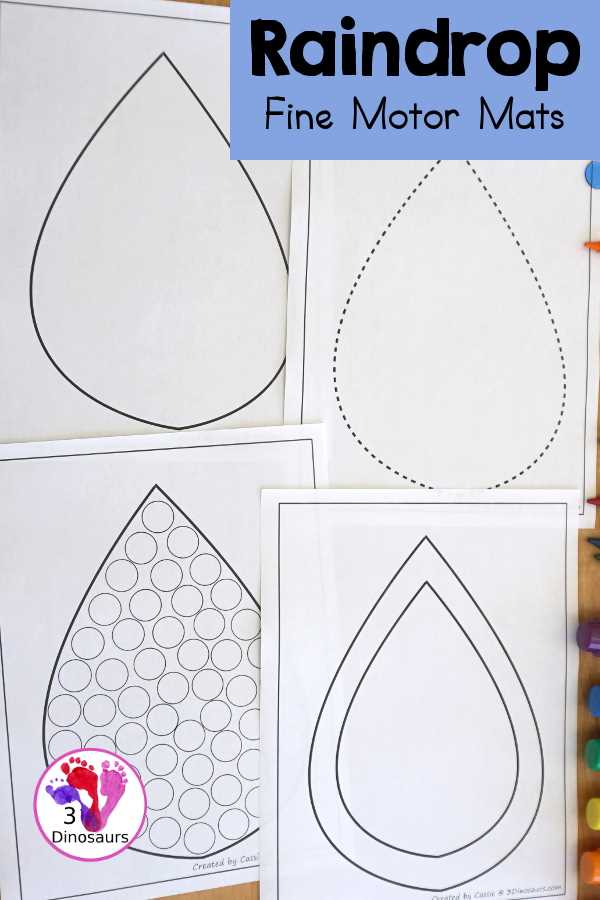
For those looking to incorporate an elegant, nature-inspired touch into their projects, a water droplet pattern can be the perfect addition. Whether you’re designing for a personal planner, stationery, or creating eye-catching decorations, a droplet-inspired layout offers a fluid and calming aesthetic that suits a variety of applications. These printable designs can be used for numerous crafting needs, making them versatile and valuable for any creator.
When preparing a print-ready format, it’s important to select a high-quality file that ensures crisp, clear results. Look for a version that allows easy customization, whether you want to adjust the size, spacing, or overall density of the droplets. Many platforms offer customizable options, giving you the flexibility to fit the design to your specific needs, whether you’re working with small or large scale prints.
Consider the type of paper you’ll be using to achieve the desired effect. Heavier cardstock will lend a more luxurious finish, while lightweight papers are ideal for easy-to-fold projects like greeting cards. Additionally, choose a print resolution that will yield the cleanest lines and sharpest details, allowing each droplet to shine in its own right.
By selecting the right design and customizing it to fit your specific needs, you can easily create a subtle yet impactful visual theme. Whether for a special event or a simple at-home project, incorporating water droplet patterns will bring a refreshing and organic feel to your creative work.
How to Create a Simple Water Drop Design for Printing
To design an elegant water drop for your next craft project, start with a clean outline that can easily be traced or cut out. Begin by drawing a symmetrical teardrop shape, ensuring both sides are even. The top should come to a sharp point, while the bottom can be rounded for a natural appearance. Keep the design minimal, as intricate details may distract from the overall flow of the shape. Once you’re happy with the outline, use software like Adobe Illustrator or even a basic drawing tool to refine it and prepare it for printing.
When adjusting the size of your image, consider the dimensions of the paper you’re printing on. If you need a larger design, scale it up while maintaining proportions. For smaller pieces, keep the image compact to fit on standard letter or A4 paper. You can also create variations with multiple sizes in a single file, allowing you to print several designs at once for different uses, such as cards, invitations, or scrapbooking accents.
To achieve a polished look, add shading or gradients within the droplet. This can be done by applying subtle gradients in software, creating a 3D effect that mimics the reflection of light on water. Alternatively, use basic crosshatching or stippling techniques for a hand-drawn effect, which adds texture and depth to the design. When printing, choose high-quality paper that can handle ink well, ensuring crisp lines and clear details. A matte or slightly textured paper works best for this kind of design.
For added creativity, consider incorporating other elements like ripples or splashes around the drop. These can be drawn lightly around the perimeter, enhancing the realism of the water droplet. Adjust the opacity of any added effects to ensure they complement the primary shape without overwhelming it. Once your design is ready, it’s time to print and cut it out, giving you a clean, professional-looking product that can be used in a variety of artistic projects.
How to Design a Simple Raindrop Shape for Printing
Start by creating a basic outline of the water droplet using vector graphic software like Adobe Illustrator or Inkscape. Choose a round base with a pointed tip at the bottom. This will help define the shape clearly. Make sure to adjust the curves smoothly for a natural look.
Once the basic form is set, focus on the size and proportions. A droplet should have a height roughly 1.5 to 2 times the width. This ratio is key to achieving a realistic and visually appealing design.
For clean edges, use the pen tool to define the outline, ensuring the curves are even. The more symmetrical the design, the better it will print. It’s essential to keep the curves gentle to avoid sharp angles or uneven lines, which may distort the image when printed.
- Keep the design simple: a minimalistic style works best for clear prints.
- Adjust the stroke thickness depending on your printer’s resolution for a sharp outcome.
- Avoid intricate details; the simpler the design, the better it will scale for printing.
If you’re working on a black-and-white design, fill the shape with a solid color or gradient to create depth. Use a subtle gradient from light grey at the top to dark at the tip to mimic light refraction in water droplets.
Once the design is finalized, make sure to check the file format. Save it as a high-resolution vector file, such as SVG, so it can be resized without losing quality. If you are using a raster format, ensure it’s at least 300 DPI for printing purposes.
Before sending the file to print, test the design by printing on a smaller scale. Check that the edges remain sharp and the overall shape is intact. If any adjustments are needed, refine the curves or the gradient fill for better clarity.