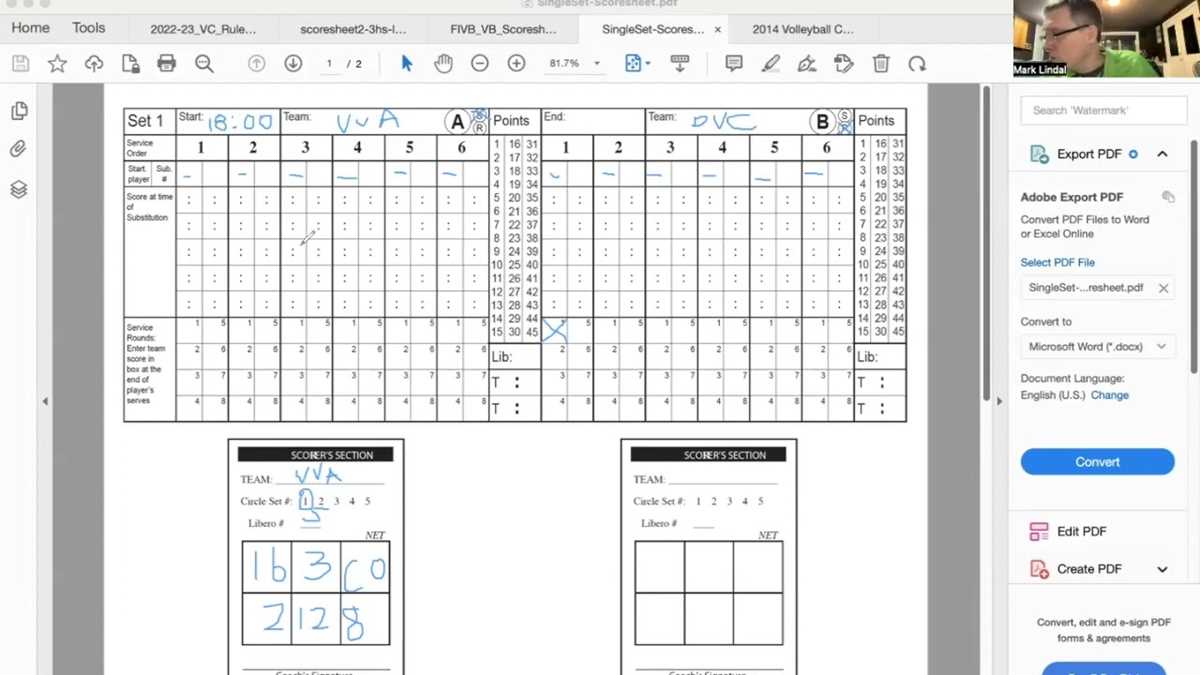
Start tracking the key aspects of player performance with tailored game logs. Customize your tracking forms to cover areas like serve accuracy, passes, blocks, and points scored, ensuring that no detail is missed. Whether you’re a coach or analyst, having a precise record allows you to make informed decisions based on raw data.
Streamline your process by using templates that are easy to update during games. These forms can be adapted to different team dynamics, focusing on stats that matter most to your team’s strategy. Don’t get bogged down in complex software or spreadsheets–keep it simple and effective with hard copies that you can edit on the fly.
Make real-time adjustments by tracking players’ performance in critical areas. Evaluate specific actions like receptions, assists, or defensive plays to measure team efficiency. By comparing each player’s performance from match to match, you’ll gain insights into improvement areas and highlight standout contributions.
Utilizing ready-to-go forms during practices and games allows you to maintain organized records for long-term analysis. This method simplifies post-match reviews, ensuring you can quickly identify patterns and trends that inform future tactics.
Tracking Player Performance with Accurate Templates
For coaches and analysts, recording detailed metrics of player actions is a must. Focus on key areas such as serves, passes, and attacks to better evaluate each player’s contribution. A reliable format that breaks down performance by category allows for easy tracking of areas needing improvement. Choose a template that offers space for individual player information, including their total attempts and success rates for each skill.
Break the game into actionable segments. For instance, categorize sets into rotations and phases, so patterns in each player’s movement and decision-making become more visible. If a player consistently performs well in defense but struggles in offensive plays, it’s easier to pinpoint these trends using structured layouts.
Ensure the document provides room for match conditions and opponent analysis. Understanding how players perform against specific teams or in varied settings (e.g., indoor vs outdoor) can provide valuable context to raw numbers. Record where a player tends to score or lose points, especially during critical moments like set points or when under pressure.
Make your document adaptable to different match types. Whether tracking statistics during practice games or official tournaments, having a flexible sheet helps accommodate the varying intensity of each. Customizable templates that let you add or remove columns for specific events give you full control over the data collected.
As you track progress over time, generate summaries of performance trends. Look at metrics like serve accuracy or dig efficiency across multiple games to evaluate consistency. Over time, these sheets become a valuable tool for both the player and coach to measure growth.
Finally, invest in an easy-to-read format. Complex designs can overwhelm, so stick with clear layouts that display numbers logically. Prioritize simplicity, ensuring that each metric is instantly recognizable and interpretable with minimal effort. Use bold fonts or color-coding for highlights and key numbers.
HTML
How to Create Custom Volleyball Stat Sheets for Your Team
Begin by deciding which metrics to track. Focus on the data most relevant to your team’s needs, such as kills, blocks, assists, aces, and errors. Customize your layout by prioritizing the most important statistics for easy tracking during a match.
Organize the information in clear, distinct columns. Label each player by number or name to make identification quick. Group related data points together, such as attack points and reception errors, for simplicity and fast access.
Use simple, easy-to-read fonts and clear borders to separate each section. This will help during fast-paced matches when time is of the essence. Avoid overcrowding by leaving space for additional notes or adjustments throughout the game.
Incorporate formulas or pre-filled calculations if possible. This could include automatic totals for points, assists, or other cumulative stats. Having these ready in advance speeds up the process and minimizes errors during the game.
Customize your document based on team preferences. For instance, add color-coded highlights to distinguish key moments or players. This visual cue can provide faster insights at a glance, especially in busy game environments.
Consider including areas for coaching feedback or post-game analysis. A small section to jot down notes about the performance or adjustments for the next match can be invaluable for improving team strategies.
Test your design by printing a sample. Adjust the layout if the printed version doesn’t meet your expectations, ensuring everything fits neatly and is legible. Regularly update your format as your team’s dynamics and goals evolve.