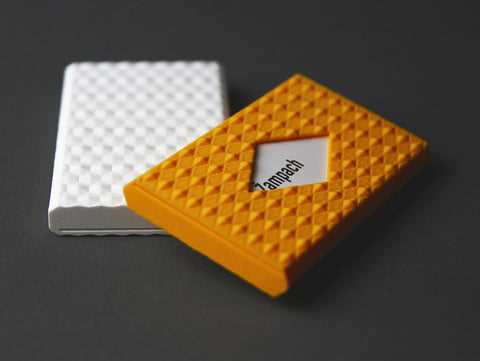
To create your own 3D printed storage compartment for business essentials, begin by choosing a high-quality filament. PLA is a great starting option due to its ease of use and environmental benefits, while ABS offers durability for everyday handling. Make sure your 3D printer supports the material you select, and calibrate your printer for best results.
Choosing the Right Dimensions
Measure the dimensions of the items you wish to store. Whether you need a compact solution for a few cards or a larger structure, precise measurements are crucial. If you are storing a variety of sizes, consider designing a modular piece that can adapt to different items. Use design software like Tinkercad or Fusion 360 to set up your model, adjusting the width, height, and depth to fit your needs perfectly.
Printing Tips for Optimal Results
Once your model is ready, ensure you set the appropriate layer height for fine detail and strength. A layer height of 0.2 mm is generally a good balance between quality and speed. Use support structures if your design includes overhangs or intricate details. Adjust print speed settings to ensure smooth extrusion, avoiding any warping or shifting during the printing process.
After printing, carefully remove your design from the build plate. You may need to do some light post-processing, such as sanding rough edges or adding a coating for a smooth finish. A coat of matte or gloss finish spray can add a professional touch, depending on your preference.
If you’re looking to customize further, consider adding engravings or personalized designs to your creation. Many 3D printing platforms allow for detailed customization, so you can add initials, logos, or patterns to make the piece uniquely yours.
Testing the fit and usability after printing is important. Place your items inside the container to check the ease of access and security. If necessary, tweak your design and reprint for improvements. This iterative process ensures that your end product not only looks good but functions well for your needs.
3D Printable Storage Design Guide
Start by selecting a user-friendly design software like Tinkercad or Fusion 360 to create a custom storage unit. Choose the dimensions based on the items you need to store, ensuring enough space for both thickness and width. If you plan to store several types of items, incorporate adjustable compartments into your design for better organization.
After finalizing your design, check for any intricate details or overhangs that may need support structures during printing. If your design requires fine details, use a layer height of 0.1mm or 0.2mm for a smooth finish. Choose materials like PLA for ease of printing or ABS if durability is required. Adjust the print settings for the material you’ve selected to ensure proper extrusion and adhesion.
Once your design is printed, test the fit by placing the objects inside the structure. This will help you identify any areas for improvement, such as adding more space or adjusting the opening size. Post-processing may include sanding edges or adding a finishing coat for a polished look, depending on the material used. Reiterate this process if necessary for the perfect result.