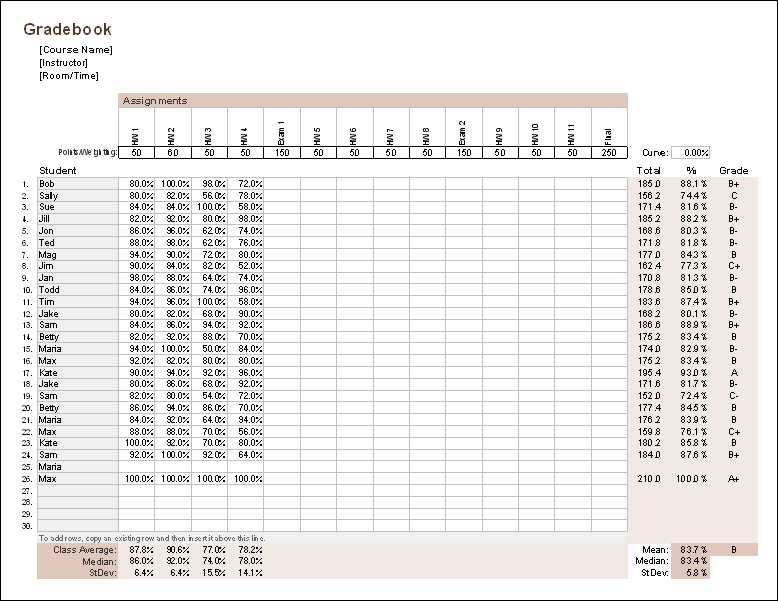
To track student performance accurately, using a detailed spreadsheet to record grades is one of the most practical solutions. You can design it to include columns for each assignment, exam, and overall performance. This allows you to instantly see how a student is progressing in specific areas. Customizing such a record-keeping system will also let you add extra categories, like participation or project grades, based on your specific grading structure.
When setting up the system, be sure to use a clear layout. Separate sections for assignments, attendance, and final grades will make it easier to understand at a glance. Grouping assessments by type or date ensures you can track trends over time. You can also add a final column to automatically calculate total grades based on your chosen criteria. This will save you time and reduce human error when entering numbers.
Regularly updating your system is key. Make it a habit to input scores as soon as you grade assignments to avoid backlogs. A consistent approach ensures you never miss an update, keeping both you and your students informed. A solid grading system also helps with transparency, allowing students to understand how they’re performing and what areas they need to focus on for improvement.
Customizing Your Own Grading Spreadsheet
Begin by creating a clear structure for tracking student scores. Include columns for assignment names, dates, and categories such as quizzes, projects, or final exams. By organizing these into a logical sequence, you can quickly input data without confusion.
Incorporate formulas to automate grade calculations. For example, use a weighted average formula to reflect the importance of various assignments. This ensures that every entry is accounted for correctly without having to manually adjust totals. For better clarity, color-code the rows or columns to easily differentiate between types of assessments.
Don’t forget to add space for attendance and behavior if relevant. Keeping these in the same document allows you to have all student-related data in one place. You can add extra columns at the beginning or end of the sheet to track participation or any extra credit opportunities.
Review your layout periodically. As you gather data throughout the term, make sure the format remains intuitive and accessible. It’s important that both you and students can interpret the records with ease. Adjust as needed to fit the course structure or any changes to grading criteria.
Consider printing out a physical copy of your spreadsheet at regular intervals to have a backup. In case of any software issues, having a hard copy ensures that all information is still available. Regular backups also allow for smoother transitions when entering data into digital systems at the end of the semester.
How to Customize a Printable Gradebook for Your Classroom
Start by deciding what categories best reflect your grading criteria. For example, create sections for homework, quizzes, participation, and projects. Organize them in the order of importance based on your syllabus, ensuring that the most significant grades have more weight in the final score calculation.
Next, set up rows for each student, including their name, ID, and any specific subcategories you might need (such as assignments for different units). This will help you track progress over time in each area of your course. Make sure the layout is consistent and easy to navigate, with clear labels and enough space for every student’s data.
Incorporate formulas to simplify calculations. For instance, set up automatic totals for each student, using a formula to sum their scores and calculate averages. Add a final column that gives the overall grade, applying any necessary weightings for different types of assessments.
Finally, leave room for additional notes. Include a column where you can jot down comments or feedback for each student. This will make it easy to personalize records and track areas where a student may need extra attention. You can also adjust the format to accommodate special grading needs, such as extra credit or different grading scales.