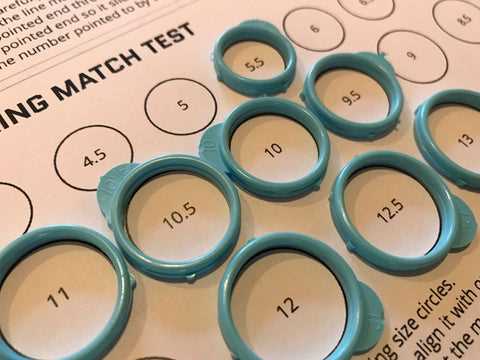
Set your printer to 100% scale and verify accuracy with a control line of exactly 50 mm before cutting the finger gauge. Any scaling like “Fit to Page” distorts measurements and leads to a wrong circumference reading.
How to Prepare and Verify the Paper Finger Gauge
Download a PDF template that includes a millimeter ruler and a reference square (for example, 5 x 5 cm). After printing, measure the ruler with a metal caliper or a physical ruler. If 10 mm on paper differs by more than 0.5 mm, adjust print settings and repeat.
Use thick paper between 120–160 gsm to prevent stretching. Cut the strip along the outer line with sharp scissors to avoid jagged edges that affect alignment. Create a small slit where marked so the strip can slide and form a loop around the finger.
How to Measure Finger Circumference Accurately
Wrap the paper band around the base of the finger, keeping it parallel to the knuckle. Pull until snug but not tight; you should be able to rotate the loop slightly without forcing it. Read the millimeter mark where the arrow meets the scale. Repeat three times and calculate the average.
Measure at the end of the day when fingers are slightly larger. Avoid taking readings after exposure to cold water. If the knuckle is wider than the base, measure both points and choose a diameter that slides over the knuckle without slipping off easily.
Converting Millimeters to US and EU Standards
Use circumference in millimeters to match common charts. For example:
- 52 mm ≈ US 6
- 54.5 mm ≈ US 7
- 57 mm ≈ US 8
- 59.5 mm ≈ US 9
EU markings usually match inner circumference in millimeters, so 54 equals 54 mm. Compare your averaged value directly with the chart rather than rounding up blindly.
Alternative Method with Existing Jewelry
Place a well-fitting band on a printed circle chart and match the inner edge to the closest outline. Ensure the inside boundary aligns with the printed circle, not the outer metal edge. If between two options, select the larger one for comfort.
Common Measurement Errors to Avoid
- Printing with automatic scaling enabled.
- Using thin office paper that stretches.
- Measuring swollen fingers after exercise.
- Reading the overlap at an angle instead of straight on.
Accurate millimeter readings combined with verified print scale provide reliable results for ordering jewelry without visiting a store.
Printable Ring Size Tool
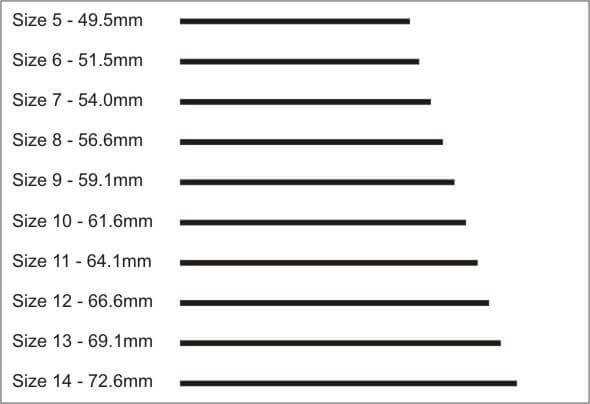
Print the finger measuring strip at 100% scale and confirm accuracy with a 30 mm control line before cutting. Use paper плотностью 120–160 gsm so the band does not stretch while wrapping around the finger. Insert the pointed end into the slit to form a loop, tighten until it sits snugly at the base without compressing skin, and read the millimeter mark at the arrow. Repeat three times and calculate the average value to reduce deviation.
Measure at room temperature in the evening, as finger circumference can increase by 0.5–1 mm during the day. If the knuckle is wider than the base, take two measurements and choose the diameter that passes over the joint without force. Compare the millimeter result with US and EU charts directly; for example, 54 mm corresponds to US 7, while 57 mm aligns with US 8. Avoid printer scaling options such as “Fit” or “Shrink,” since a 2% distortion can shift the reading by nearly half a standard increment.